What Are Cover Letter Margins
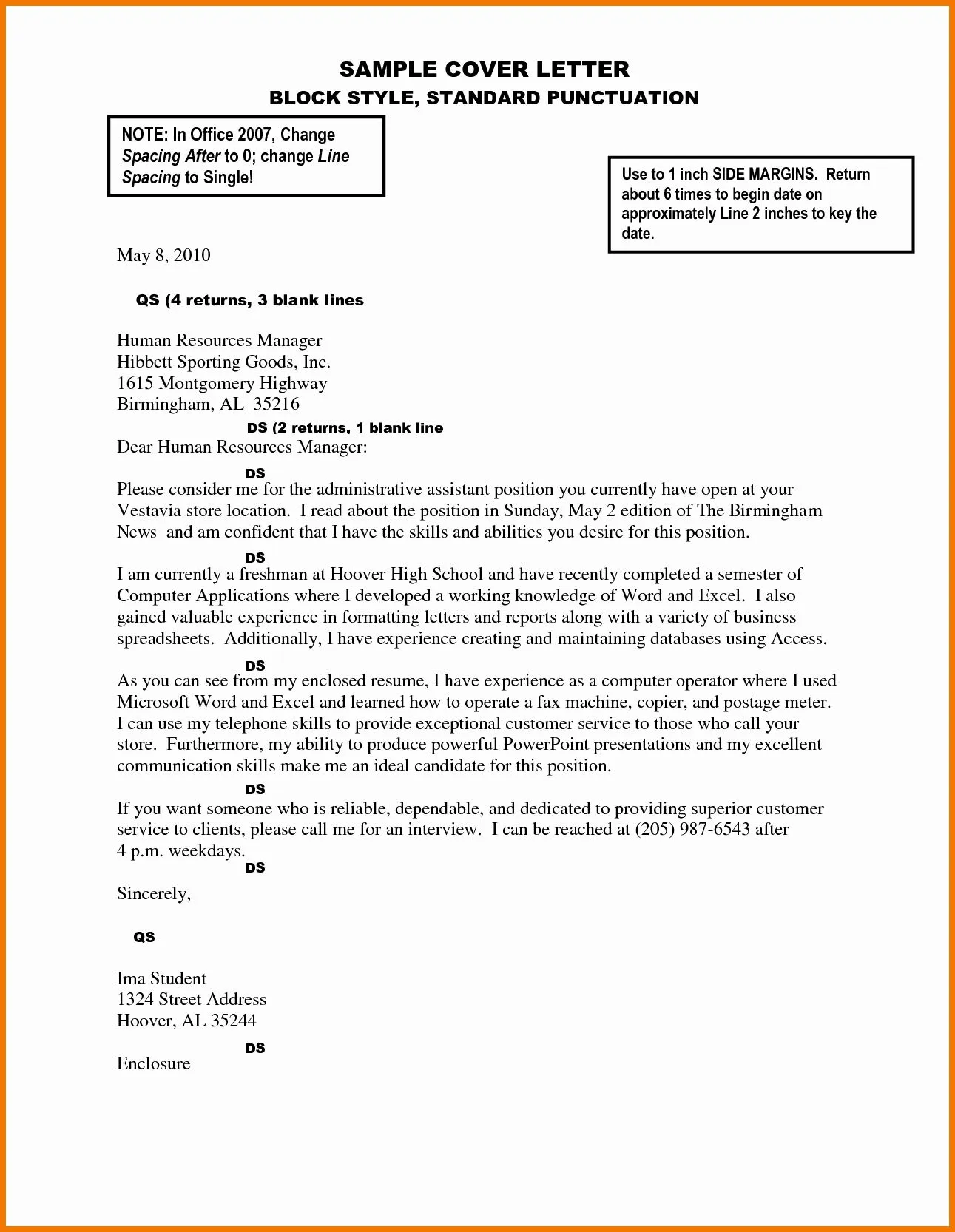
Cover letter margins refer to the blank space surrounding the text on your cover letter. They define the boundaries of your content, creating a frame for your message. These margins are not merely aesthetic choices; they significantly influence the visual appeal, readability, and overall professionalism of your cover letter. Choosing the right margins is a crucial step in crafting a cover letter that makes a positive impression and helps you stand out in a competitive job market. Understanding the function and importance of these margins allows you to present your qualifications effectively, making a compelling case for why you are the ideal candidate for the position. They contribute to the overall neatness and organization, ensuring your cover letter is easy to read and leaves a lasting positive impact on potential employers.
Standard Cover Letter Margins
The standard margin size for a cover letter is typically one inch on all sides (top, bottom, left, and right). This is the universally accepted default setting in most word processors, ensuring that your cover letter maintains a professional look and feel. The one-inch margin setting provides a balanced visual experience, allowing ample white space around the text. This helps prevent the document from appearing cramped or overwhelming. While the standard is one inch, slight variations are acceptable. Some individuals opt for 0.75 inches or 1.25 inches, depending on the specific font and the content of their cover letter. However, it’s best to stick to the one-inch margins for general applications unless there’s a specific reason to deviate.
Why Cover Letter Margins Matter

Cover letter margins do more than just frame the text; they significantly influence how your cover letter is perceived and processed. The correct margins will boost the overall aesthetic appeal and readability. Furthermore, in the digital age, where Applicant Tracking Systems (ATS) are frequently used, understanding the impact of margins is very important. It can be the difference between a cover letter that gets read and one that gets automatically rejected. Properly formatted margins significantly affect the ease with which a hiring manager can read your cover letter. They contribute to the visual flow, making the content accessible and inviting. This is especially important in an environment where recruiters often have limited time to review applications.
Professional Appearance
Well-defined margins provide a polished, professional appearance. They help maintain a clean and organized layout, signaling to the reader that you pay attention to detail. This is a significant factor when it comes to the initial perception of your application. A cover letter with properly set margins immediately communicates professionalism. This gives the impression that you are meticulous and thorough in all aspects of your work, which can set you apart from other applicants. The layout makes it easier for the hiring manager to focus on your qualifications rather than being distracted by a messy or unorganized document.
Readability and Visual Appeal
Margins play a crucial role in the readability and visual appeal of your cover letter. Sufficient white space around the text reduces visual clutter, making it easier for the reader to focus on the content. Too little white space can make a cover letter look cramped and difficult to read. Using the right margins enhances the overall visual appeal and makes your cover letter more inviting. This makes your cover letter more engaging. A cover letter with appropriate margins encourages the reader to delve into your qualifications and experiences.
The Impact on ATS Systems

Applicant Tracking Systems (ATS) are increasingly used to screen resumes and cover letters. Properly formatted cover letters are crucial. Cover letters formatted with standard margins are generally better parsed by ATS systems. Incorrect margin settings or irregular formatting can cause the ATS to misinterpret your document. This can lead to important content being missed or, in extreme cases, your cover letter being rejected outright. Ensuring your cover letter’s margins are standard will significantly improve your chances of being noticed. Make sure the ATS correctly interprets your document.
How to Set Cover Letter Margins [Step-by-Step]
Setting margins is a simple process, depending on which word processor you use. The general steps are similar across most applications, allowing you to adjust top, bottom, left, and right margins. This ensures your cover letter has the right structure. It’s essential to check the settings and make adjustments as needed. Doing this properly helps maintain your document’s professional appearance, increasing its readability. While setting the margins is straightforward, the consistent application of the correct settings is what matters.
Using Word Processors
In most word processors, you can find margin settings in the ‘Page Layout’ or ‘Layout’ tab, often under the ‘Margins’ option. You can choose from a range of pre-set options, such as ‘Normal’ (typically 1-inch margins), or you can customize your margins. To customize, select ‘Custom Margins,’ then specify the values for the top, bottom, left, and right margins. The software also allows you to preview how the changes will affect the document layout. This is crucial for visualizing how the margins will impact the overall appearance. Using these settings ensures a professionally formatted cover letter, giving the impression of detail-oriented work.
Margin Settings in Google Docs

In Google Docs, adjust your margins by going to the ‘File’ menu, selecting ‘Page setup.’ This will open a dialog box where you can set the top, bottom, left, and right margins. The default margins are typically one inch. Make any necessary adjustments here to change them. Similar to other word processors, Google Docs provides a preview. The key benefit of Google Docs is that it is cloud-based, making it easy to share and collaborate on your cover letter. Using Google Docs ensures that your cover letter will maintain consistency in formatting across various devices.
Best Margin Settings for Different Situations
While the standard one-inch margin is suitable for most situations, some scenarios might benefit from slight adjustments. This could depend on the specific industry, the design of your cover letter, or the requirements set by the employer. It’s important to understand when and why you might deviate from the standard guidelines to ensure your cover letter is perfectly formatted.
Margins for Traditional Cover Letters
For traditional cover letters, stick to the standard one-inch margins. This will ensure your cover letter looks neat and professional, aligning with the expectations of conventional applications. This layout will make sure your cover letter is easy to read. The traditional approach emphasizes professionalism, so proper margins are essential. The use of one-inch margins with a formal font creates a balanced, polished appearance.
Margins for Modern Cover Letters

Modern cover letters sometimes use slightly wider margins (up to 1.25 inches) to create a more open and airy layout. This is especially useful if you are using a more contemporary font or incorporating design elements. However, be cautious not to make the margins too wide. Using more white space can enhance the visual appeal, giving the cover letter a clean, modern feel. The broader layout can improve readability, particularly if the document is densely packed with text. When trying wider margins, ensure it still maintains a professional appearance.
Margins for ATS-Friendly Cover Letters
When formatting your cover letter to be ATS-friendly, it is essential to stick to the one-inch margins. Using standard margins will ensure the ATS can accurately parse your document. Avoid any unusual margin sizes or formatting styles that the ATS might misinterpret. Simplistic, clean formatting increases the likelihood of your document being properly processed. A cover letter that is ATS-friendly will make your application get noticed. By following these standards, you increase your chance of getting through the initial screening process.
Avoiding Common Margin Mistakes
Making mistakes with cover letter margins can have significant consequences. Inconsistent margins can be distracting and convey a lack of attention to detail. Therefore, understanding and avoiding these pitfalls is important to make a good impression.
Too Wide Margins
Using margins that are too wide (e.g., 1.5 inches or more) can make your cover letter look sparse and unprofessional. It can create excessive white space that makes your text appear disconnected. The hiring manager might see this as a lack of attention to detail. It is important to strike a balance between readability and an uncluttered appearance. It’s always better to maintain the standard or slightly wider margins. They help maintain a professional look while ensuring good readability.
Too Narrow Margins
Conversely, margins that are too narrow (less than 0.75 inches) can make your cover letter look cramped and difficult to read. Such a design can be visually unappealing. Cramming text close to the edges of the document makes it hard for the eye to follow the lines of text. It can also make the document appear rushed or unprofessional. Always ensure there is sufficient white space around the text to make it readable.
Inconsistent Margins
One of the most common mistakes is having inconsistent margins throughout the document. This occurs when the margins on different sides of the page are not uniform. Inconsistent margins will make your cover letter look sloppy and poorly formatted, demonstrating a lack of attention to detail. The irregularity can distract the reader from your qualifications. Always double-check that the margins are consistent on all sides to maintain a professional appearance.
Tips for Perfecting Your Cover Letter Margins

Once you have set your margins, there are several other steps you can take to ensure your cover letter looks perfect. These steps include proofreading and considering the font choice. These tips will help you create a polished cover letter that will make a good first impression. By paying attention to every detail, you can significantly improve your chances of getting noticed.
Proofread Carefully
Proofreading is essential for ensuring your cover letter is free of errors. Typos and grammatical errors will instantly make your cover letter look unprofessional. Read your cover letter thoroughly, and consider having a friend or family member review it for any mistakes. Ensuring the correctness of spelling and grammar helps convey your professionalism. A proofread document makes you look like a competent professional.
Consider Your Font Choice
The font you use also impacts the overall appearance of your cover letter. Choose a clear and professional font such as Times New Roman, Arial, or Calibri. The font size should typically be between 11 and 12 points for easy readability. The right font will make your cover letter visually appealing. Make sure it is easy for the reader to read. Make sure your font is consistent throughout the entire document, and it should complement your margin settings.
Test Print Your Cover Letter
Before sending your cover letter, always test print it to ensure the margins, formatting, and overall layout appear as intended. This will help you identify any potential issues that might not be visible on the screen. Check if the margins are correct and if there is enough white space. A test print allows you to make final adjustments to make sure your cover letter is professional. This final step will help ensure your cover letter makes a positive impression on the hiring manager.
Conclusion
Cover letter margins are a critical element of a well-crafted job application. By understanding their importance and implementing them correctly, you can create a document that is both visually appealing and easy to read. Remember to use the standard one-inch margins, proofread carefully, choose a professional font, and test print your document. These steps will significantly enhance your cover letter’s effectiveness and improve your chances of landing an interview. Paying attention to details such as margins shows a commitment to professionalism and attention to detail, both highly valued qualities by employers. The right margin can make your cover letter stand out.