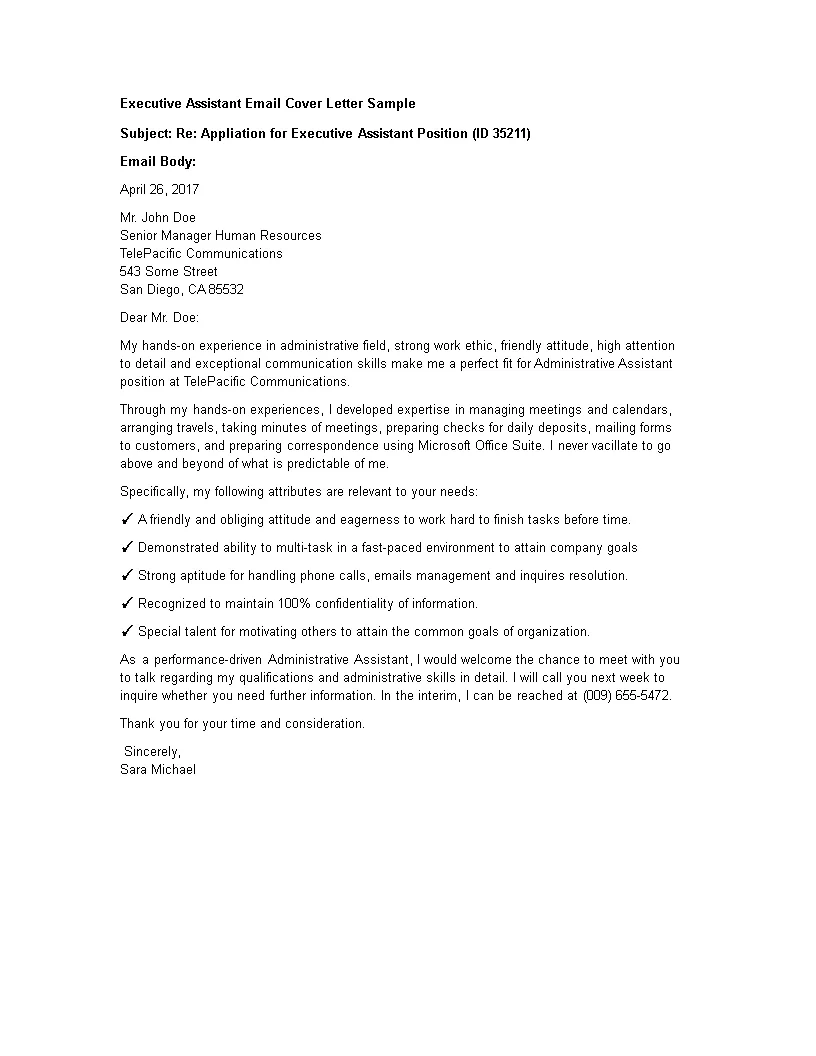
Crafting a Cover Letter Email [The Essentials]
In today’s digital age, the way you apply for jobs has evolved significantly. Email has become the standard for submitting cover letters and resumes. Knowing how to write a cover letter by email is crucial for making a positive first impression on potential employers. This guide will walk you through every step of crafting a professional and effective cover letter email, from the subject line to the final send, ensuring your application stands out. Mastering the art of email cover letters is no longer optional, it’s essential for career success. It is a critical skill to get a job.
The Subject Line That Gets Opened
Your email subject line is the first thing a hiring manager sees, making it a critical factor in whether your email gets opened. A clear, concise, and professional subject line is key. Avoid generic phrases like ‘Cover Letter’ or ‘Job Application’. Instead, include the job title and your name. For example, use ‘Application for Marketing Manager - [Your Name]’. This immediately tells the recipient what the email is about and who it’s from. If the job posting specifies a particular subject line, adhere to those instructions meticulously. This attention to detail demonstrates your ability to follow instructions and your genuine interest in the position. A well-crafted subject line significantly increases your chances of your email being read and considered.
Formatting Your Email Cover Letter

The formatting of your email cover letter should be clean, readable, and professional. Use a standard, easy-to-read font like Arial, Calibri, or Times New Roman. Keep the font size between 10 and 12 points. The body of your email should be well-structured with clear paragraphs and ample white space. Avoid overly long paragraphs; keep them concise and focused. Use bullet points or numbered lists to highlight key skills or achievements, making them easy to scan. Maintain consistent alignment, typically left-aligned, and ensure proper spacing between lines and paragraphs. Proper formatting ensures readability and showcases your attention to detail, which are essential qualities employers look for.
Body of Your Cover Letter Email
The body of your email is where you introduce yourself and make your case for the job. It should be well-written and tailored to the specific position. Begin with a professional salutation, such as ‘Dear [Hiring Manager name]’. If you do not know the name, ‘Dear Hiring Manager’ is acceptable, but always try to find the name of the person you are addressing. The email should be concise, typically no more than four or five paragraphs. Your email should quickly explain your interest in the role and provide a brief overview of your most relevant qualifications and experience. The body should highlight how your skills and experience align with the job requirements. Close the email with a professional closing and your contact information.
Opening Paragraph
Your opening paragraph should immediately capture the reader’s attention and clearly state the purpose of your email. Begin by mentioning the specific job you are applying for and where you found the job posting. Briefly express your enthusiasm for the opportunity and the company. If you have a connection or referral, mention it in the opening paragraph, as it can immediately increase your chances of being noticed. The introduction is your first chance to make a positive impression and encourage the reader to continue reading. Keep it brief and to the point, aiming to pique the reader’s interest and make them want to learn more about you.
Highlighting Your Skills and Experience

The body of your email should highlight the skills and experiences that are most relevant to the job you are applying for. Focus on the key requirements mentioned in the job description and provide specific examples of how you have demonstrated those skills in the past. Use action verbs to describe your accomplishments and quantify your achievements whenever possible. Instead of simply stating your responsibilities, explain what you achieved and the impact you had. This demonstrates your abilities and helps the hiring manager visualize your potential contributions to their company. Tailor each cover letter to the specific job, showcasing the skills and experiences that align with the position’s needs.
Tailoring Your Message
Avoid using a generic cover letter. Tailor each email to the specific job and company. Research the company, understand their values, and address the hiring manager’s needs. Mention specific projects or initiatives you admire or align with. Show the hiring manager how your skills and experience meet the requirements of the job and company. Customizing your message shows your genuine interest in the position and the organization. This level of personalization significantly increases the likelihood of your application being seriously considered. It demonstrates your attention to detail, research skills, and ability to meet the unique needs of each opportunity.
Call to Action and Closing
Your call to action should prompt the reader to take the next step, such as scheduling an interview. Express your enthusiasm and reiterate your interest in the role. Thank the reader for their time and consideration. End with a professional closing, such as ‘Sincerely’ or ‘Best regards,’ followed by your full name. It is also a good idea to include your phone number and email address in the closing. This closing reinforces your professionalism and makes it easy for the hiring manager to contact you. A well-crafted call to action and closing will give you a final chance to make a positive impression.
Attaching Your Cover Letter and Resume

Attaching your cover letter and resume correctly is essential. Attach both documents as PDF files, as this ensures that your formatting remains consistent across different devices and operating systems. Name your files clearly using your name and the document type, such as ‘Your Name - Cover Letter.pdf’ and ‘Your Name - Resume.pdf.’ Always double-check that you have attached the correct files before sending your email. Mention in the email body that you have attached your resume and cover letter for their review. This reminds the recipient to look for them and increases the chances of them being opened and reviewed. Proofread the attached documents for any errors, ensuring they are error-free.
Proofreading and Sending Your Email
Before sending your email, proofread it carefully for any grammatical errors, typos, and formatting inconsistencies. A polished email demonstrates your professionalism and attention to detail. Use a grammar checker and read the email aloud to catch any mistakes you might have missed. Ensure all attachments are included and correctly named. Double-check the recipient’s email address to avoid sending your application to the wrong person. Once you are confident that your email is error-free, send it at a reasonable time. Avoid sending applications late at night or very early in the morning, as this might create a negative impression. Send the email from a professional-looking email address. The final step is to send the email.
Troubleshooting Common Email Cover Letter Issues
Even with careful planning, issues may arise. One common problem is a lack of response. If you haven’t heard back within the timeframe mentioned in the job posting (or within a week or two), consider following up with a polite email. Be respectful of the hiring manager’s time. Another common issue is formatting problems. To prevent formatting issues, always send your documents as PDFs and check how they appear on different devices. Ensure your attachments are the correct files, and verify your email address and phone number. If your email is not getting noticed, check the subject line to make sure it is clear, concise, and relevant. Review the content of the email to make sure it is tailored to the job and company.